FREE TOOL
Free Password Generator: Turn a Phrase Into a Strong Password
Make a strong password in seconds. Type a phrase you will remember and the Word Game turns it into a tough 12–18 character password. Or pick Totally Random for the strongest option. It is free, there is nothing to sign up for, and nothing you type leaves your browser.
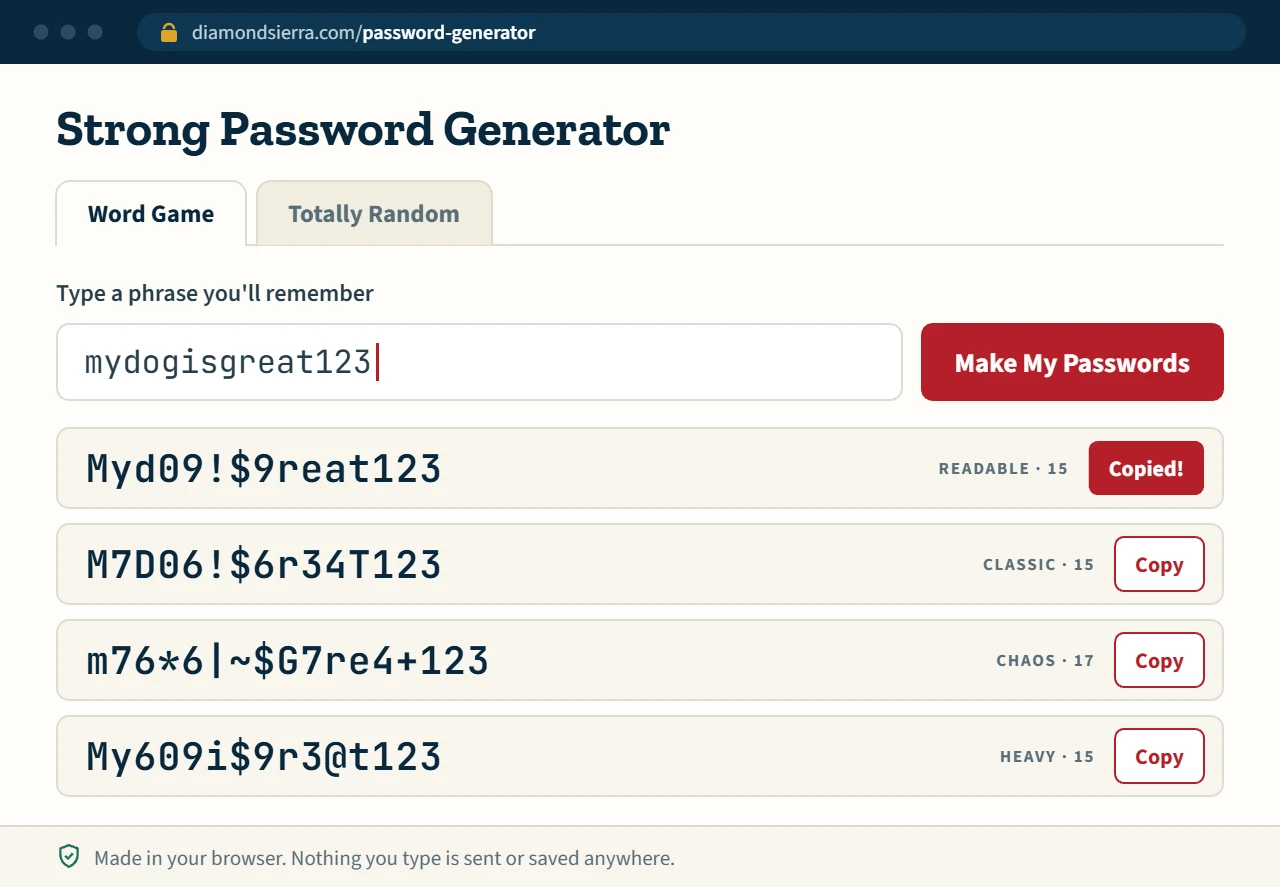
We swap letters for look-alike numbers and symbols, mix the case, and fit it to 12–18 characters. Pick the version you like best.
Still using mydogisgreat123?
You are not alone. Plenty of people use one easy password everywhere: a pet, a birthday, a favorite team, plus "123" at the end. Those are the first guesses a password-cracking tool tries.
Totally random passwords are best, and a password manager that remembers them for you is better still. But sometimes you need a password in a pinch: a new Wi-Fi router, a client login, the account you are setting up on someone else's computer. That is what the Word Game is for. Start with words you already know and end up with something far harder to guess.
How the Word Game works
- Type a phrase. Anything you will remember, like
wehatehackedwebsitesorcoffee before email. - Letters become look-alikes. a can become @ or 4, e becomes 3 or &, s becomes $ or 5, t becomes + or 7, and so on.
- Case gets mixed. Some letters turn upper case so the password has both.
- Length is fixed to 12–18 characters. Long phrases drop some letters, mostly vowels. Short ones get extra numbers and symbols.
- You pick one of six versions. Each click gives six new versions in different styles, from easy-to-read to heavy on symbols.
Here is what it made from three phrases:
| Your phrase | Some of what you get |
|---|---|
mydogisgreat123 | Myd09!$9reat123 · M7D06!$6r34T123 |
wehatehackedwebsites | We#thaCk6we8$i+e · Weate#a(k6WB$t&$ |
coffee before email | <offee8e#ore3Mail · Co##E&8&f*R&Em^1! |
Every click gives new versions, so yours will be different.
Word Game or Totally Random: which should you use?
| Word Game | Totally Random | |
|---|---|---|
| Easy to remember | Yes, it starts from your own words | No, save it in a password manager |
| Strength | Good | Best |
| Use it for | Wi-Fi, a quick account, a password you have to type by hand | Email, banking, your website admin, anything important |
Be honest with yourself about the account. If losing it would hurt, use Totally Random and save the password in a password manager.
What makes a password strong
- Length. 12 characters at the very least. Every extra character makes it much harder to crack.
- One password per account. Never reuse a password, especially your email password.
- No personal details. Leave out names, pets, birthdays, addresses and sports teams.
- A mix of characters. Upper and lower case letters, numbers and symbols.
- Two-factor login. Turn it on wherever it is offered. A stolen password alone is then not enough.
Is this password generator safe?
Yes. Your passwords are made by the browser's built-in cryptographic random number generator, the same kind used for encryption. Nothing you type or generate is sent to Diamond Sierra or anyone else, and nothing is stored. You can load the page, go offline, and it still works.
Protect the logins on your own WordPress site
A strong password protects one account. If you run a WordPress site, Diamond Sierra Site Defense protects every login on it. It is a free plugin with login protection, two-factor login, optional blocking of passwords that have shown up in known breaches, a firewall and a daily malware scan.
Password generator questions
Can I turn a phrase into a password?
Yes. Type the phrase into the Word Game above. It swaps letters for look-alike numbers and symbols, mixes upper and lower case, and fits the result to 12–18 characters. You get six versions and keep the one you like.
How long should a strong password be?
Use at least 12 characters, and longer is better. Length adds more strength than any single trick, so a random 16-character password is far harder to crack than a short one full of symbols. Every password this page makes is 12–18 characters.
Is a word-game password as strong as a random one?
No. Cracking tools know the usual letter swaps (a to @, e to 3, s to $), so a password built from a phrase is easier to guess than one made of random characters. It is still far better than a plain word or a reused password. Use Totally Random for email, banking and anything important.
Is this password generator safe to use?
Yes. The passwords are made in your browser with its built-in secure random number generator. Nothing you type or generate is sent to our server or saved anywhere, and the tool keeps working if you go offline after the page loads.
Should I use a password manager?
Yes, if you can. A password manager remembers a different random password for every account, so you only need to remember one. This generator is for the times you need a good password right now and the password manager is not handy.
Can I use the same password on more than one site?
No. When one site is breached, attackers try the same email and password on other sites. A unique password for every account keeps one breach from turning into several.