Fix first
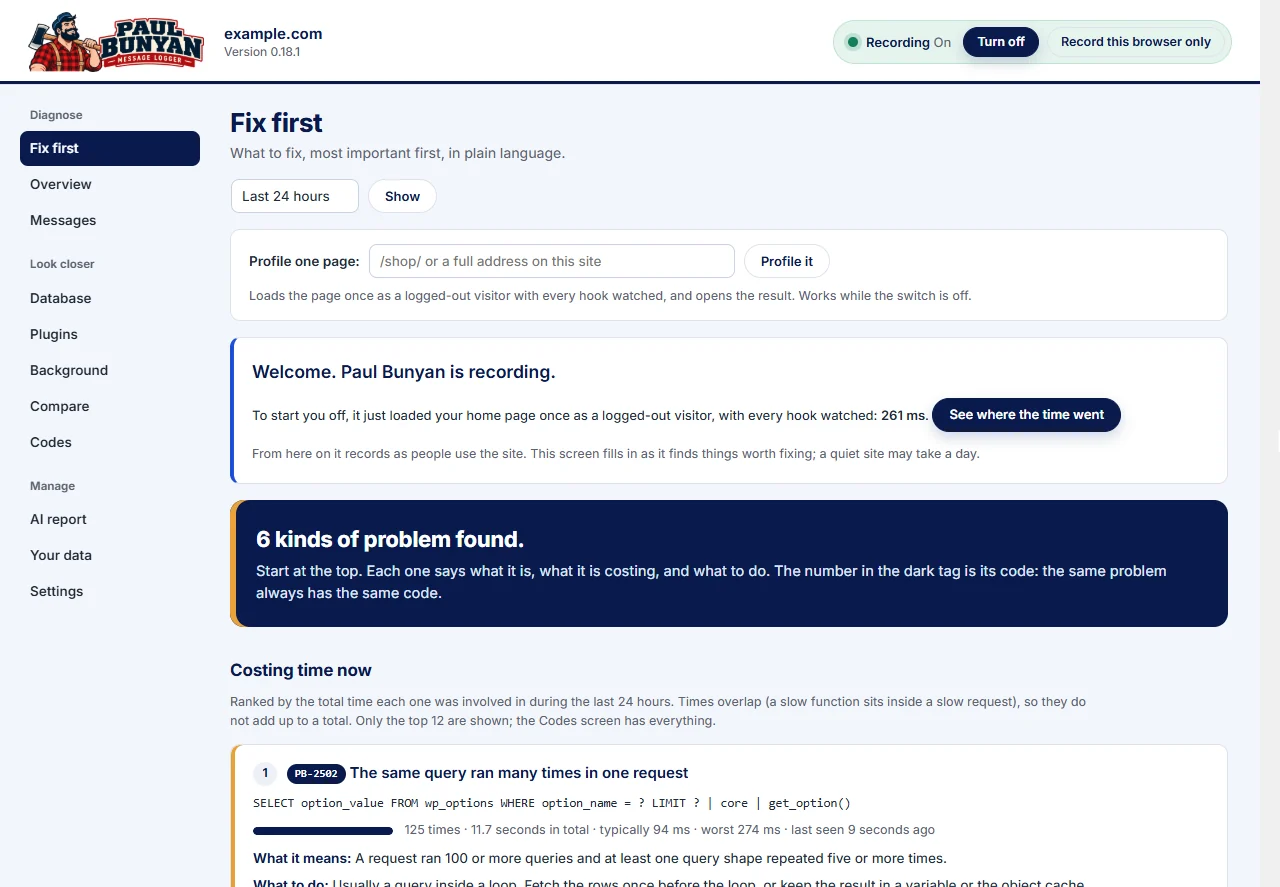
One list, ranked by cost, with what each problem is, where it is and what to do about it. It is the screen Paul Bunyan opens on.


Paul Bunyan for WordPress · Since 1999
Paul Bunyan records every request on your site, then gives you one ranked list of what to fix first. Each item names the plugin, the file and the line.
*Measured on one WooCommerce test site, logged in, 20 loads per page. Runs on any host. No server extension.
From messages to meaning
The usual advice stops at WP_DEBUG or turning plugins off one at a time. The first gives you a log nobody explains. The second takes an afternoon and tells you nothing about why. Paul Bunyan starts where that advice stops.
Example log. Thousands of repeats, one real failure buried in the middle.
How it works
No code changes and no server extension. It installs like any other plugin.
Search “Paul Bunyan” under Plugins › Add New and activate it. That is the whole setup.
Load a few pages, or leave it for a while. It records every request: hooks, queries, outside calls, email, jobs and errors.
One ranked list of what to fix. Each item has its PB code, the plugin, file and line, and what to do about it.
Try it yourself
Paul Bunyan broke this checkout down and showed what the buyer was waiting for. Step through the two fixes and watch the time come off.
Recorded by Paul Bunyan on our own WooCommerce test store. Your site will differ. Following one order across checkout, emails and background jobs is part of Professional.
Inside the plugin
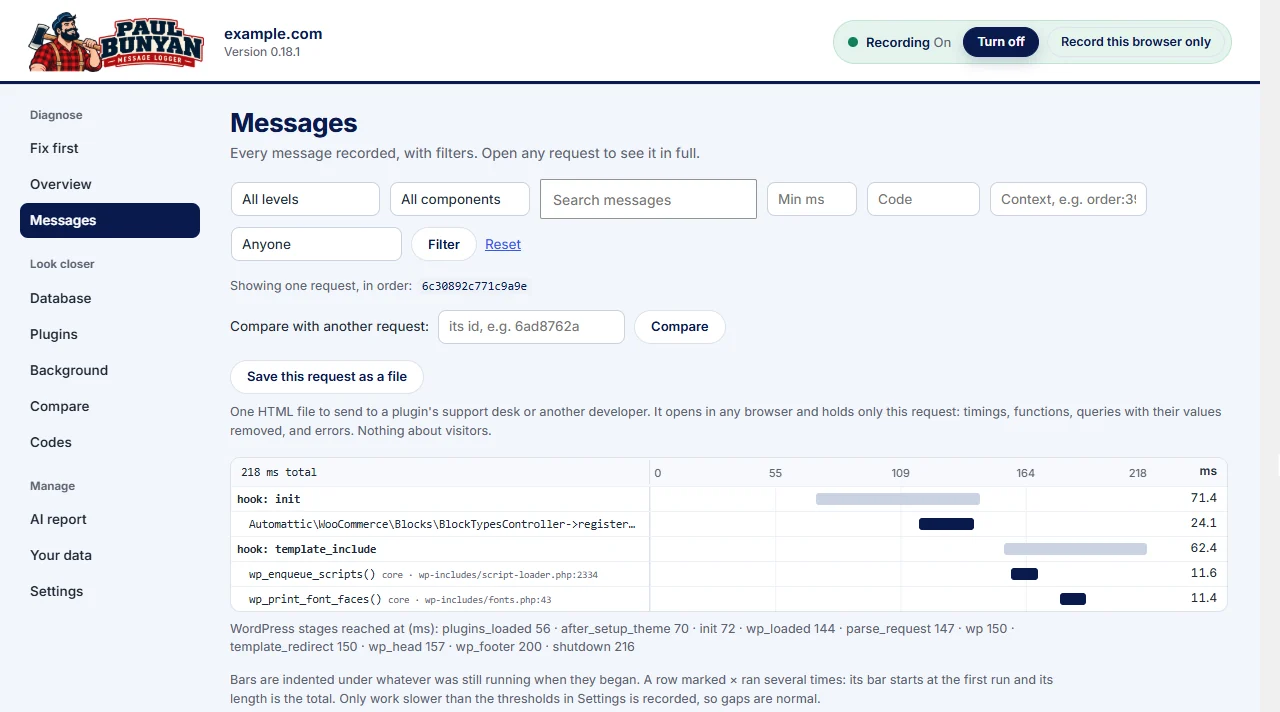
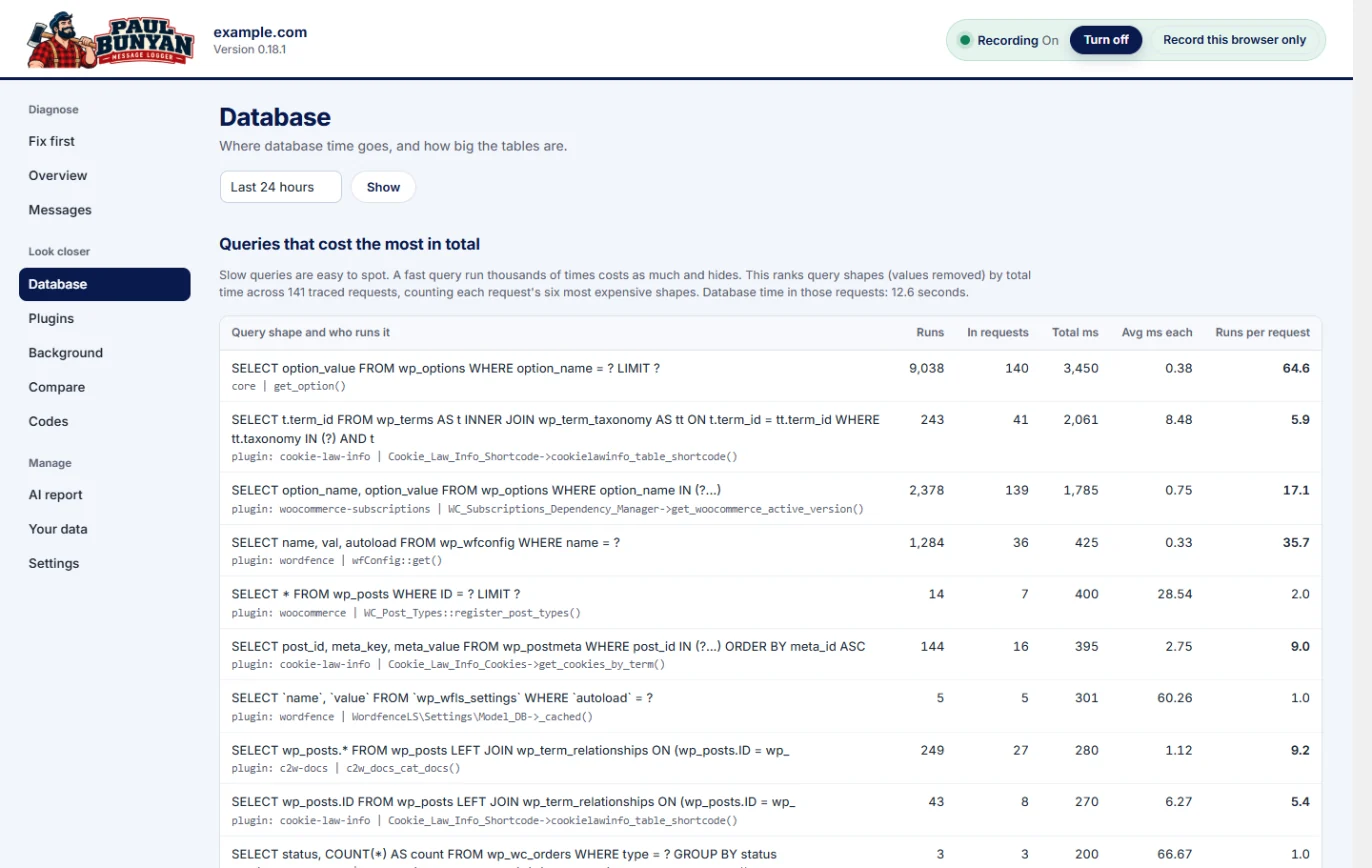
Real screens, recorded on our test sites. Everything here is in the free edition.



What you get
Everything below is in the free edition. It starts recording the moment it is installed, with no code changes.
One list, ranked by cost, with what each problem is, where it is and what to do about it. It is the screen Paul Bunyan opens on.
About 10 to 20 ms per request on one WooCommerce test site, logged in, 20 loads per page. It measures its own cost and shows it to you.
Slow queries, outside calls, emails and PHP errors, each traced to the plugin, file and line responsible.
The 2 a.m. checkout, the scheduled job that overran, the admin page that timed out. Kept for you.
Ten logging functions for your plugin or theme, in the same timeline as everything else.
Copy or download a report of your findings and paste it into any AI assistant. On WordPress 6.9+, AI tools can read findings directly.
A plugin and nothing else. No server extension, no root access, shared hosting included.
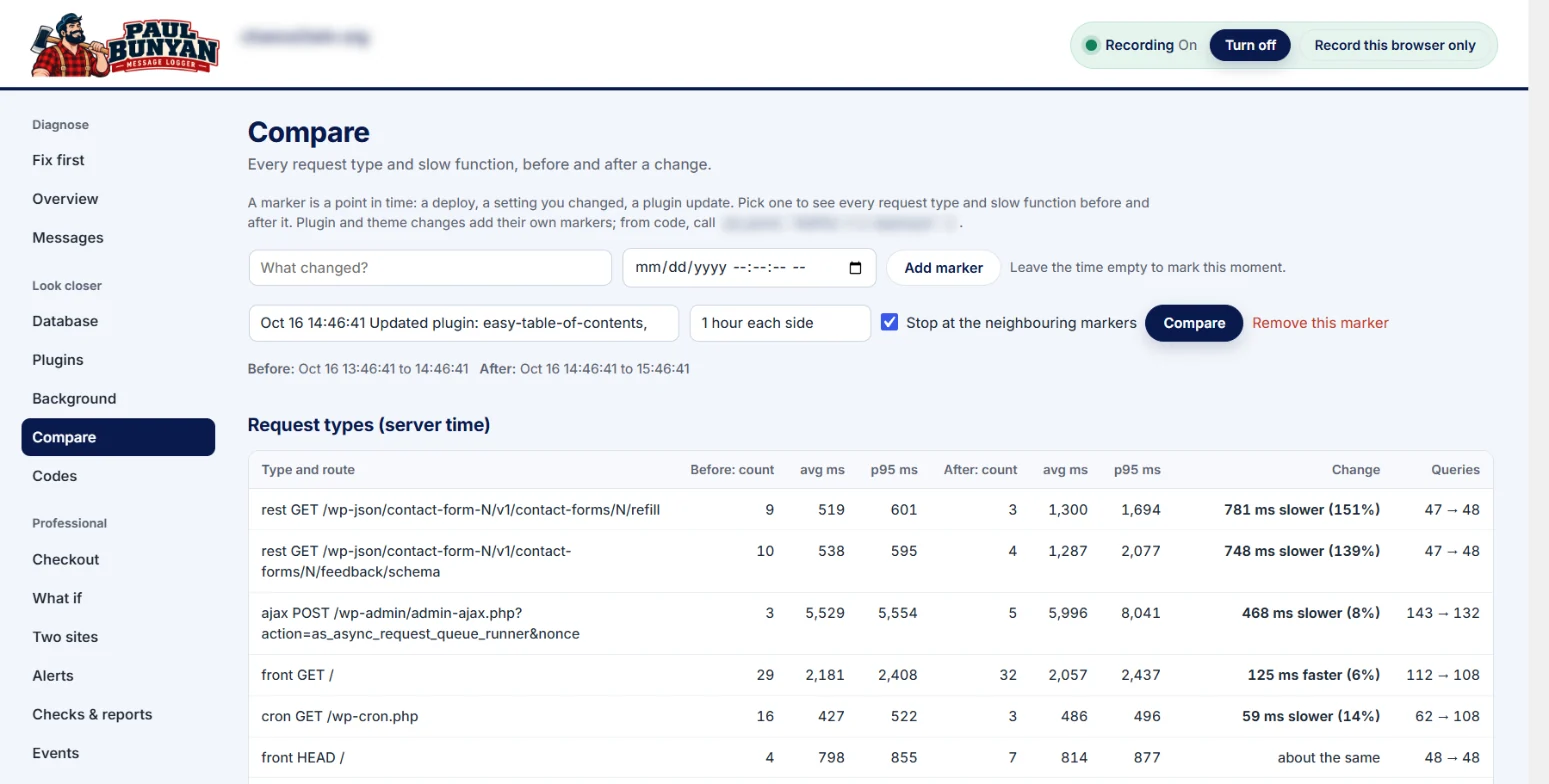
Put a slow request beside a fast one and see which hooks, queries and outside calls made the difference.
Why it is different
The two things everyone tries first, side by side with what Paul Bunyan records.
| Question | The debug log | Turning plugins off one at a time | Paul Bunyan |
|---|---|---|---|
| Names the plugin, file and line | ~ For errors only | ~ By elimination, eventually | ✓ For every finding |
| Shows slow code, not just errors | ✕ No | ✕ No | ✓ Queries, hooks, outside calls, email |
| Catches the requests nobody was watching | ~ Errors only | ✕ No | ✓ Every request is recorded |
| Groups thousands of repeated notices | ✕ Every line repeats | ✕ No | ✓ One row with a count |
| Ranks what to fix first | ✕ No | ✕ No | ✓ By cost, with what to do |
| Safe on a live site | ~ Public by default, and it grows | ✕ Features break while you test | ✓ A safety switch turns it off if its cost climbs |
Is your debug.log public? How to check, protect and clear it
Who it is for
One developer finds the slow plugin with the free plugin. The team adds Professional for every site it looks after.
Order emails, payment and shipping calls, and repeated queries often run while the customer waits. Paul Bunyan shows which one, and whose code sent it.

Your messages land in the same request timeline as the hooks, queries and outside calls around them, so a user’s “it is slow” becomes evidence.
paul_bunyan_info() and the other paul_bunyan_ functions, with levels and timingspaul_bunyan_log action does nothing when the plugin is not installedpaul_bunyan_scope() times any block of your own codeFor developers
Your messages land beside the hooks, queries, outside calls and emails of the same request, with levels and timings.
paul_bunyan_info(), paul_bunyan_warn() and friends for your plugin or themepaul_bunyan_scope() to time any block of your own codepaul_bunyan_context, paul_bunyan_event and paul_bunyan_mark to tie requests into one trailpaul_bunyan_log action keeps your code working with or without the plugin// Safe whether or not Paul Bunyan is installed.
do_action(
'paul_bunyan_log',
'info',
'shop',
'Cache warmed',
array( 'items' => 24 )
);
// Or call the functions directly.
paul_bunyan_info( 'shop', 'Pulled SKUs from supplier' );
paul_bunyan_warn( 'shop', 'SKUs missing a price', array( 'count' => 3 ) );From our investigations
1,315→499ms
On a WooCommerce test store, Paul Bunyan showed that emails and push notifications were sent while the buyer waited. Moving that work out of the way cut checkout time by 62%.
10–20ms per request
Paul Bunyan's own cost, measured on one WooCommerce test site, logged in, 20 loads per page. If its cost climbs, the safety switch turns it off by itself.
Results from individual investigations. Your site will differ.
A useful free tool. Room to grow.
The free plugin records everything and stays free. Nothing in it is locked, timed or switched off later. Professional pays for continued development and support.
Records everything. Every screen.
On as many sites as you like.
A separate add-on to the free plugin.
For 1 live site. Staging copies are free.
Yearly, renews automatically. Refunds within 14 days.
The free plugin is the trial. It records everything and every screen works, so you can see what Paul Bunyan finds on your site before you buy.
For 3 days the free plugin keeps everything it recorded. From day 4 to day 7 it keeps every request, anything slow or failed, anything with a PB code, browser timing and cost per plugin, and drops the routine detail.
No. Staging and local copies do not count toward the site limit. Only live sites do.
Professional keeps working, and your recorded data is not deleted.
Free answers
Measure what each plugin costs per request, in place of switching them off one at a time.
GuideUsually order emails, payment and shipping calls, or repeated queries, run while the customer waits.
ErrorHow to find the exact plugin, file and line behind it, and get the site back.
ErrorRaising the limit is the quick fix. Finding what used the memory is the real one.
Logging tools since 1999
Paul Bunyan began as a message logger for Windows developers, published by Levon's Wake and later Diamond Sierra. It recorded the component, file and line behind every message, and it was used inside Fortune 100 companies through the Y2K years.
It spread the way developer tools do: one developer used it, the team adopted it, and it went along to the next job. This is the same idea, rebuilt for WordPress and PHP by the same people.

No code changes and no server extension. Within minutes you have a ranked list of what is costing your site the most, and where it lives.
Free from the WordPress.org plugin directory, with support in its forum.