
PAUL BUNYAN
Paul Bunyan showed WooCommerce running on pages that sell nothing
Our own site loaded the whole store on every docs page. A small must-use plugin now loads it only where people shop: uncached pages answer 42% faster and use 57% less memory.
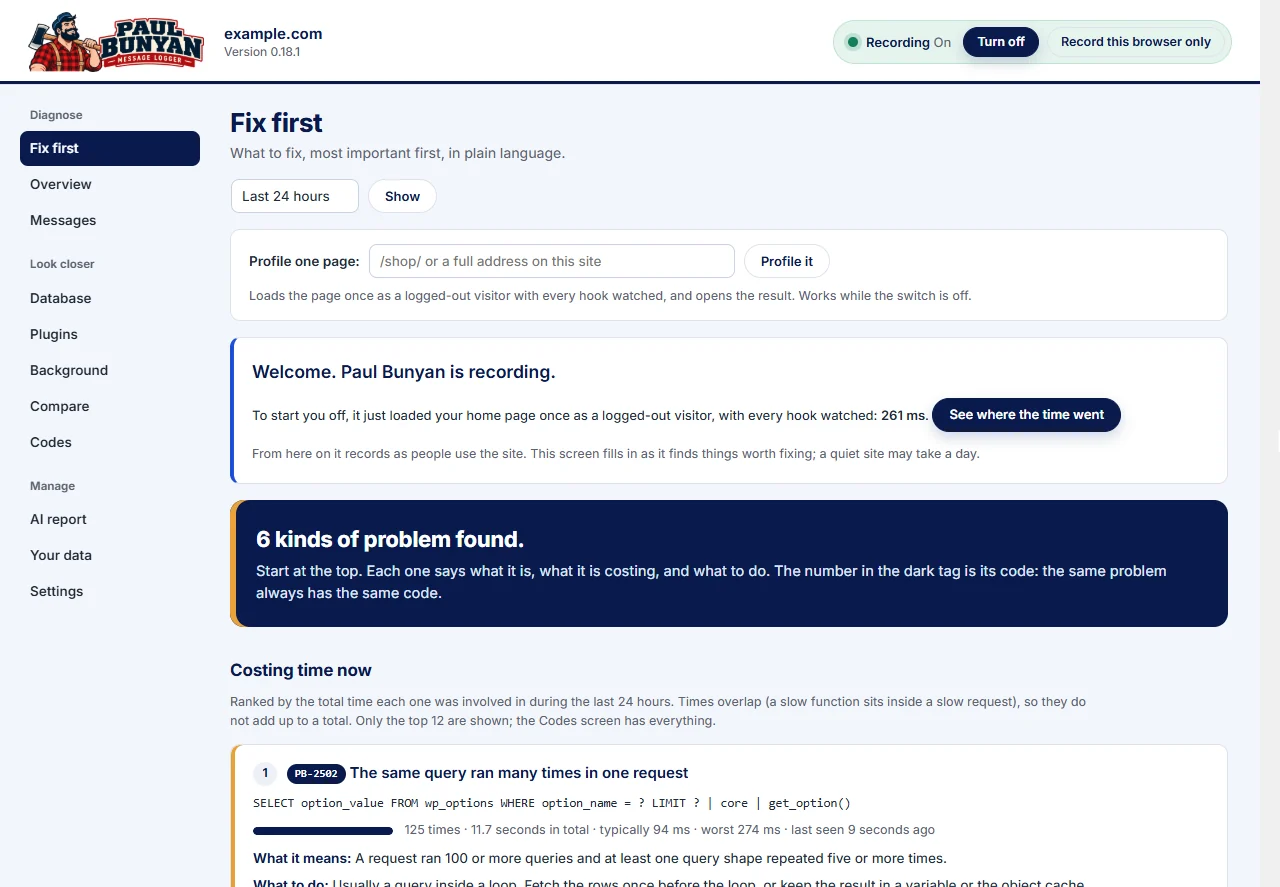
The store was running on pages that sell nothing.
diamondsierra.com sells one product, Paul Bunyan Professional, through WooCommerce with WooCommerce Subscriptions and the Stripe gateway. Almost everything else on the site is reading: documentation, PB code pages, guides, the history of the original Windows logger and these case studies. None of those pages has a cart, a price block or a checkout.
WordPress does not know that. Every active plugin loads on every request, so the whole store started up for every docs page. Paul Bunyan made the cost visible, and a small must-use plugin now loads the store only where people shop.
What this case study establishes: on uncached, logged-out requests for eight non-store pages (40 requests before, 40 after), Paul Bunyan recorded median server time falling from 296.5 to 171.4 ms, processor time from 238.6 to 150.4 ms and peak memory from 46 to 20 MB. It does not measure cached pages, which already skip WordPress, or traffic under load.
What Paul Bunyan showed.
Three screens told the story before we read any code.
- Plugins, last 7 days: WooCommerce cost 103.4 ms per request and 28.4% of all measured plugin time, in 4,000 of 4,000 recorded requests. Subscriptions added 21.5 ms and Stripe 21.1 ms, also in every request.
- Fix first: store code ranked among the slowest functions on the site: WooCommerce’s payment-method registry, its admin-settings registration, its package start-up and the Subscriptions REST routes, plus the slow hook that registers payment methods for store blocks (PB-2601 and PB-2602).
- Messages, one request: a request for the install guide showed WooCommerce registering its store blocks for 99 ms, its payment methods for 79 ms and the Stripe gateway for 79 ms. A visitor reading documentation was paying for checkout set-up.
Paul Bunyan ranks by cost and names the plugin, function, file and line. Deciding that a docs page does not need a payment gateway is the judgment you bring.
Why a page cache was not the whole answer.
We had just installed LiteSpeed Cache, and logged-out pages dropped from about 275 ms to about 27 ms. A cached page never starts WordPress, so it never starts WooCommerce either.
Every cache miss still does: the first visit after a page is edited or the cache is cleared, crawlers and link checkers, links with unique query strings, and pages that must not be cached. On a documentation site, edits clear the cache often. Those misses are where the store’s start-up cost lands.
The fix: a small must-use plugin.
WordPress loads must-use plugins before ordinary plugins and lets them adjust the list of active plugins for one request through the option_active_plugins filter. Ours removes WooCommerce, WooCommerce Subscriptions and the Stripe gateway from that list when all of these are true:
- the request is a logged-out GET or HEAD page view;
- the visitor has no cart or store session cookie;
- it is not wp-admin, the REST API, AJAX (including WooCommerce’s own), cron, WP-CLI, XML-RPC or a login;
- it carries no query arguments other than tracking tags such as utm_source (add-to-cart, wc-api, search, previews, and the download and email links our helpdesk and license plugins send all keep the store);
- the address is not a store address: the shop, products and product categories, cart, checkout, My account, support (which looks up orders), the legal pages, sitemaps and feeds.
The saved list of active plugins is never changed. Two safety rules make sure of it: if anything tries to save the plugin list or the rewrite rules during a request that skipped the store, the store plugins and their rules are kept. Skipped responses carry an X-DS-Woo-Loader: skipped header so the result can be checked from outside, and one line in wp-config.php switches the whole thing off.
Because must-use plugins live in a folder an ordinary upload cannot reach, it ships as a normal plugin that copies the must-use file into place when activated and removes it when deactivated.
What we tested before switching it on.
We checked 23 addresses and request types on the live site. The ten content pages skipped the store and rendered the same text and links as before. Every store page, the license API, the store’s cart API, WooCommerce AJAX, sitemaps (including the product sitemap), feeds and search loaded it. So did any signed-in visitor and any POST request. All three store plugins stayed active in the plugin list.
Before and after.
Both runs used the same eight pages, five uncached requests each, minutes apart, as a logged-out visitor, with the same page cache and Redis object cache in place. A unique query string on each request made sure WordPress, not the cache, answered.
| Measure | Before | After | Change |
|---|---|---|---|
| Server time (median) | 296.5 ms | 171.4 ms | 42% less |
| Processor time (median) | 238.6 ms | 150.4 ms | 37% less |
| Peak memory (median) | 46 MB | 20 MB | 57% less |
| WordPress finished loading plugins at | 108 ms | 48 ms | 60 ms sooner |
| WordPress finished starting up (wp_loaded) at | 203 ms | 99 ms | 104 ms sooner |
| Paul Bunyan’s own cost per request | 15.7 ms | 8.0 ms | half |
| Page | Server before | Server after | Faster by | CPU before | CPU after |
|---|---|---|---|---|---|
| Home | 282.8 | 160.7 | 43% | 227.1 | 140.1 |
| Install guide (doc) | 289.3 | 175.6 | 39% | 230.4 | 150.6 |
| Guides index | 290.2 | 162.6 | 44% | 226.4 | 142.5 |
| Case studies | 274.2 | 168.2 | 39% | 219.5 | 142.2 |
| Features | 309.8 | 185.4 | 40% | 253.6 | 163.2 |
| Pricing | 298.6 | 169.9 | 43% | 239.4 | 150.4 |
| History | 297.5 | 163.5 | 45% | 239.3 | 142.7 |
| PB-2202 (doc) | 312.2 | 189.5 | 39% | 249.4 | 159.8 |
Measured from the browser, the same pages went from 309–347 ms to 192–221 ms (median per page).
Where the time went.
Paul Bunyan’s cost-by-plugin breakdown shows the three store plugins accounted for about 52 ms and 5 MB directly. The rest of the saving came from work WooCommerce caused elsewhere: WordPress core time fell from 48.1 to 33.6 ms per request once there were no store blocks, post types and payment methods to register. Wordfence also measured lower, from 51.5 to 30.0 ms, most likely because a lighter request leaves more of the server free; we would not count that as a saving from this change alone.
| Plugin | Before | After |
|---|---|---|
| WooCommerce | 39.0 ms · 3.6 MB | not loaded |
| WooCommerce Subscriptions | 6.9 ms · 0.9 MB | not loaded |
| WooCommerce Stripe gateway | 6.0 ms · 0.5 MB | not loaded |
| WordPress core | 48.1 ms | 33.6 ms |
| Wordfence | 51.5 ms | 30.0 ms |
| WPForms Lite | 24.7 ms | 25.7 ms |
| GDPR cookie consent | 15.9 ms | 15.3 ms |
Less for the browser, too.
With the store skipped, content pages no longer send seven WooCommerce and Subscriptions files (about 53 KB before compression: the cart and add-to-cart scripts, cookie and order-attribution scripts, and a Subscriptions stylesheet) or four inline store scripts.
Trade-offs and what is left.
Order attribution starts at the store, and we accepted that. WooCommerce’s order attribution script records where a buyer came from. It no longer runs on content pages, so someone who finds us through a guide and then visits the product page may show as a direct visit in WooCommerce’s order source report. We decided that was fine for us: a faster documentation site matters more than recording the first page each buyer saw. If that report drives decisions on your store, add your main landing pages to the loader’s list of store addresses so the script keeps running there.
Not every plugin can be skipped this way. It works here because the theme and our own plugins check that WooCommerce is present before using it. A theme that calls store functions without checking would fail on a skipped page, so test every template first.
Next in line. The same screens now rank WPForms Lite (about 25 ms on every page, for a form on one page) and the cookie-consent plugin (about 15 ms) as the largest costs left on content pages.
Download the loader, free.
We have packaged the must-use plugin as Diamond Sierra Loader for WooCommerce and made it free for any store, under the GPL. Version 1.1.1 is a generalised version of what runs on this site:
- It reads your store addresses from WooCommerce’s own settings (shop, cart, checkout, My account and terms pages, and the product, category and tag bases), and finds any other published page that uses WooCommerce blocks or shortcodes.
- It leaves out every active plugin that declares it needs WooCommerce, so an add-on never loads without it. On this site that also took our Helpdesk and Licenses plugins off content pages.
- Any query argument other than a tracking tag keeps the store, so download links, links in emails and payment returns keep working.
- A settings screen under Settings > Loader for WooCommerce lets you add store addresses, choose extra plugins to leave out, and check any address as a logged-out visitor. Each row says whether WooCommerce was left out or loaded and flags error pages.
The measurements above were taken with version 1.0, which left out WooCommerce, Subscriptions and Stripe only.
Diamond Sierra Loader for WooCommerce 1.1.1
Free, GPL-2.0-or-later. Needs WordPress 6.0 or later, PHP 7.4 or later and WooCommerce. Install it under Plugins > Add New > Upload Plugin, open its settings, then check your home page, a blog post and every store page before you leave it on.
Download the plugin (.zip, 38 KB)Test on a staging copy first if you can. A theme or plugin that calls WooCommerce functions without checking that WooCommerce is loaded will show an error on pages where the store is left out; the address checker finds those pages so you can add them to the list. To switch everything off at once, untick the setting, deactivate the plugin or add define( 'DS_WOO_LOADER_OFF', true ); to wp-config.php.
Run the same check on your own site.
- Leave Paul Bunyan on through a normal day of traffic.
- Open Plugins and look at the “In requests” column. A plugin that runs in every request but is only used on a few pages is a candidate.
- Open one slow request for a page that does not use that plugin in Messages and read its timeline. If its hooks and functions appear, visitors are paying for it there.
- Check your theme and other plugins for calls to that plugin’s functions without a check that it is loaded.
- Write the rule narrowly: name the addresses that need the plugin and keep it for signed-in users, admin, REST, AJAX and cron. For WooCommerce, the free loader does this for you.
- Measure uncached requests before and after with the same pages and the same number of runs, and compare the medians.
- Filter Codes for PB-2201 afterwards to confirm no page started failing.
See which plugins run where they are not needed.
Paul Bunyan’s Plugins screen shows what each plugin costs on each kind of request, from a normal day’s traffic, with nothing switched off to find out.
Get Paul Bunyan free on WordPress.orgQuestions about this case study
Does this break the WooCommerce store?
No. The store loads in full for the shop, product, cart, checkout and account pages, for anyone signed in or holding a cart, and for every admin, REST API, AJAX, cron and webhook request. We tested 23 addresses and request types on the live site before switching it on.
If a page cache is on, why does this matter?
A page cache serves most logged-out visits without running WordPress at all. Every cache miss still runs it: the first view after a page changes, crawlers, links with unique query strings, and pages that cannot be cached. Those are the requests this change made 42% faster.
Can I do this without code?
Plugin-loading managers can do something similar, but any rule that removes a plugin from a request should be written for your own store’s addresses and tested. The rules this site uses are listed on this page.
How did Paul Bunyan find it?
Its Plugins screen showed WooCommerce in 4,000 of 4,000 recorded requests, costing about 103 ms each, and its request timelines showed store code (payment methods, store blocks and the Stripe gateway) running inside requests for documentation pages.
Can I download the plugin?
Yes. Diamond Sierra Loader for WooCommerce is free under the GPL. It reads store addresses from WooCommerce settings, leaves out add-ons that declare they need WooCommerce, and includes an address checker. Download it from this page and test it on a staging copy first.