
PAUL BUNYAN
Nine problems Paul Bunyan found in a custom WooCommerce build
A fatal error in report printing, a checkout warning after an order-storage migration and a page 2.6 times slower than it needed to be—found in two days, without opening a log file.
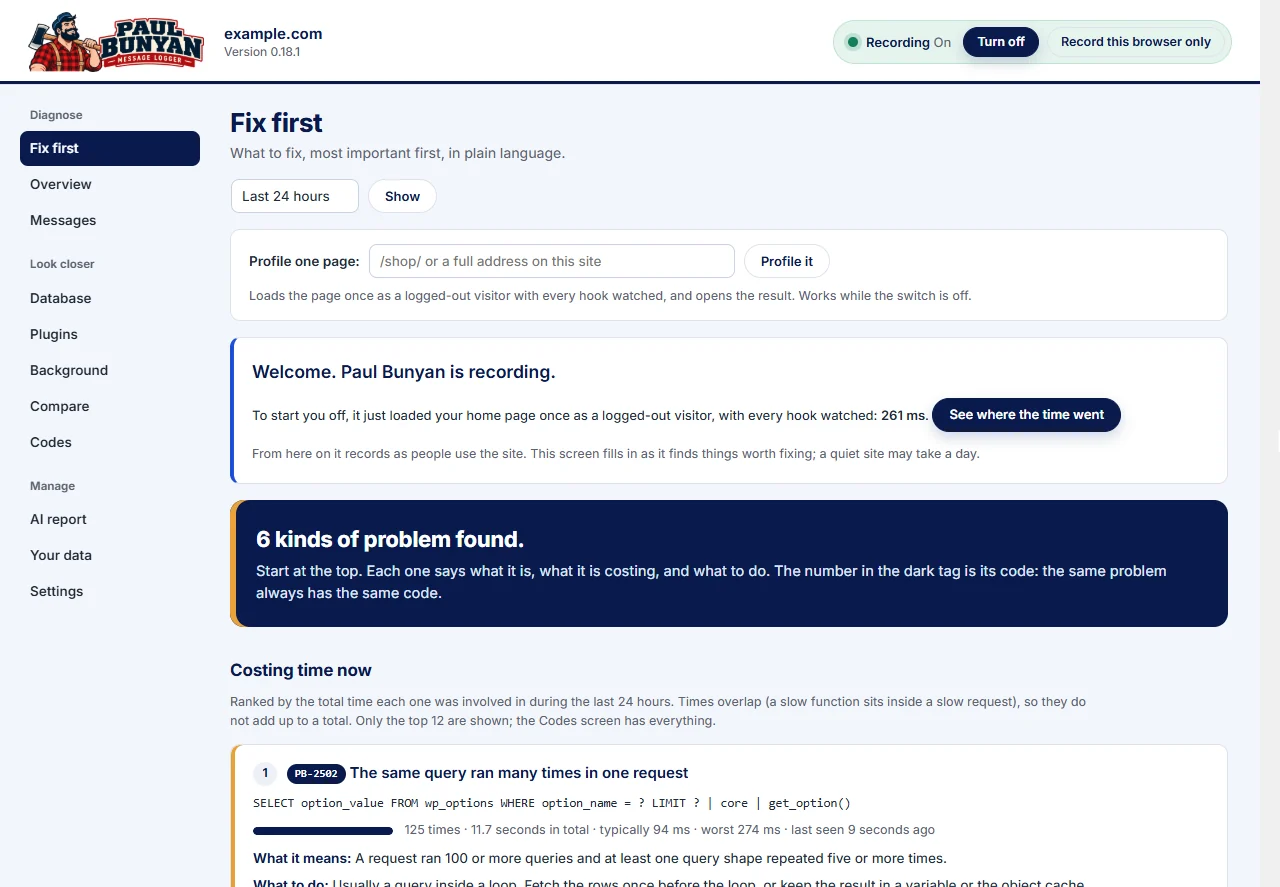
Nine problems nobody had reported.
We built a custom WordPress and WooCommerce implementation on a development site: our own plugin for ordering, customer accounts and printable reports, running on a large legacy theme carried over from an older site. Over two days of building and testing it, Paul Bunyan surfaced nine problems nobody had reported.
Two were serious: a fatal error in report printing, and a checkout warning that appeared only after we moved the store to WooCommerce’s newer order storage. Its numbers also pointed us to a page that was 2.6 times slower than it needed to be. Every fix below was found by reading Paul Bunyan first, then confirmed against its numbers afterwards.
What this case study establishes: on one development site, Paul Bunyan’s own screens identified a fatal error, warnings from four places in the theme and three performance problems, each with the code responsible. After the fixes, the slowest store-manager page went from 551 to 213 ms. It does not establish a load-test result, a production traffic figure or a comparison with another tool.
The setup.
The store was fictional: 116 sample orders, a 14-product catalog, customer accounts and about 1,800 traced requests a day. Over the two days it went from an empty site to a working store, with pay-later and walk-in orders, refunds, a move to WooCommerce’s newer order storage and a full demo rehearsal.
Paul Bunyan ran the whole time, recording every request. It kept its own cost to about 5 ms per traced request on this site and backs off on its own under load. That is the point: it was already watching when the problems happened, so nothing had to be reproduced.
What we did not do: open server error logs, turn on debug mode or add logging code. Everything below came from Paul Bunyan’s screens, plus one small timing check we added after Paul Bunyan pointed at the right function. Measurements were recorded October 30–31, 2026.
| # | What Paul Bunyan showed | Where | What it really was | Outcome |
|---|---|---|---|---|
| 1 | PB-2201 fatal PHP error, with function and file | Report printing | Theme helper calling a function from a plugin that wasn’t installed | Fixed same day |
| 2 | PB-2202 warning, 87 times in a few hours | Every page | Theme read a form field that usually isn’t there | Fixed |
| 3 | PB-2202 “property ID on null”, about 44 a day | Saving an order outside its edit screen | Theme order-update code assumed a post was on screen | Fixed |
| 4 | PB-2202 “property ID on null”, new | Checkout, right after the order-storage migration | Theme read the customer from a post that no longer exists | Fixed |
| 5 | PB-2202 warnings at two more lines | Cart and orders list | Missing checks on optional fields | Fixed |
| 6 | 453 ms block, 407 ms CPU, only 7.7 ms of queries | Customer accounts page | Loading every order’s line items just to count quantities | About 550 → 210 ms |
| 7 | One query 23 times per request | Order change page | Same lookup repeated for each product | About 300 → 250 ms |
| 8 | One report query at 28.7 ms each run | Reports, dashboard | Report recomputed on every load | Cached until an order changes |
| 9 | PB-2401 slow outside call, 27 times, about 690 ms | Saving files in the editor | WordPress’s own safety check calling the site back on every save | Explained; editor now off |
| — | PB-2805 poor LCP, 32 seconds | Homepage | False alarm from background browser tabs | Fixed in Paul Bunyan |
How we read Paul Bunyan.
We read the screens in the same order every time: start with what it ranks as most important, then narrow down until one request or one function explains the problem. The tour of the Paul Bunyan screens covers each one in detail, and reading a finding explains what every row tells you.
- Fix first, last 24 hours. The ranked list of problem kinds, each with a PB code, how often it happened and what it cost. This is where the fatal error and the warnings appeared, with file and line.
- Plugins. What each plugin and the theme cost per request, split by visitor pages, admin, background calls and scheduled jobs. It tells you whose code to look at before you look at any code.
- Database. Query shapes ranked by total time, with the function that ran them and how many times per request. Repeated lookups show up as a high runs-per-request number.
- Messages, one request. The timeline of WordPress stages for a single slow request, with its slow hooks and functions, CPU time, query count and query time. CPU time against query time tells you whether a page is waiting on the database or on PHP.
- Profile one page. Loads a page once as a logged-out visitor with every hook watched, to confirm public pages stay lean.
- Codes. Every problem kind Paul Bunyan knows, so a recurring code can be filtered across days and its last sighting checked after a fix.
What we found.
1. A fatal error in report printing
What Paul Bunyan showed: PB-2201, a fatal PHP error: “Call to undefined function get_orders_ids_by_product_id()”, with the full call chain. Our report-printing code called the theme’s report helper, which called a function from an older plugin that is not installed on new sites.
What it meant: on any new site, printing a report would have shown a blank error page. It happened once, on the first test print, so nobody would have noticed until someone needed a report on a deadline.
Fix: our code now calls that helper only when the function it depends on exists. It took minutes because the message named the function, the file and the line. Reports for all 116 orders have printed and formatted correctly since.
2. A warning on every single page
What Paul Bunyan showed: PB-2202, “Undefined array key add-to-cart”, 87 times in a few hours, in the theme’s functions file.
What it meant: harmless to visitors, but every page wrote a warning, which on a busy sales day fills logs and adds time to each request.
Fix: a one-line theme patch that checks the field exists first. Paul Bunyan’s last sighting is the minute the patch went in.
3 and 4. “Property ID on null,” before and after the order-storage migration
What Paul Bunyan showed: PB-2202, “Attempt to read property ID on null.” First, about 44 times a day when an order was saved from somewhere other than its edit screen. Then, after we moved the store to WooCommerce’s newer order storage, the same warning appeared at checkout on a different line.
What it meant: the theme assumed an order is always a WordPress post on the screen. With the new order storage, orders are no longer posts, so that code quietly read nothing. The first case would have skipped order-status updates; the second read an empty customer.
Fix: both now read the customer from the order itself. This is the clearest example of Paul Bunyan catching a problem we created: the migration passed every number check, and only Paul Bunyan showed the checkout warning.
5. Two more theme warnings
What Paul Bunyan showed: PB-2202 at two other lines: “product_id” on cart requests and “order_actions” on the orders list.
Fix: checks on both. A rebuild of the theme now reports 44 of 44 fixes applied.
6. A page that was slow for a reason nobody would guess
What Paul Bunyan showed: the Customer accounts page took 519 ms. Opening that one request in Messages showed 407 ms of CPU time but only 7.7 ms of database time across 159 queries, nearly all of it inside one 453 ms block of our own code.
What it meant: the page was not waiting on the database; it was doing PHP work. That ruled out adding indexes or caching queries and pointed at a loop. A small timing check inside that function showed 300 ms of 360 ms went to loading every order’s line items just to count the quantities on each order.
Fix: count the quantities with one query instead of loading 77 orders’ worth of line items. About 550 ms → 210 ms, with every row of the table identical to the cent.
7. The same question asked 23 times per page
What Paul Bunyan showed: on the Database tab, one query shape ran 275 times across 12 requests—22.9 times per request.
What it meant: the order change page asked “what has this customer already ordered?” once for each product on the page.
Fix: the answer is kept for the rest of the page and thrown away the moment any order changes. The page went from about 300 ms to 250 ms.
8. A report rebuilt on every load
What Paul Bunyan showed: the report-lines query averaged 28.7 ms each run.
Fix: the result is kept until any order or order line changes. Together with building the site’s settings once per page instead of thousands of times, store-manager pages gained 10 to 15 ms each.
9. A slow call nobody made on purpose
What Paul Bunyan showed: PB-2401, a slow call to another service, 27 times at about 690 ms: the site calling itself.
What it meant: that is WordPress’s safety check when a plugin file is saved in the built-in editor—it loads the site to make sure the change didn’t break it. It was our deploy method at the time.
Fix: once our security plugin, Diamond Sierra Site Defense, turned the file editor off, we moved to uploading a plugin package, and the calls stopped.
False leads and blind spots.
Not everything Paul Bunyan ranked high was a problem, and one real problem never showed up in it. Both taught us how to read it.
The 32-second homepage that wasn’t. PB-2805 reported the homepage’s main content appearing after 32 seconds, three times. Measured in a visible tab, it painted in 0.28 seconds. The readings came from browser tabs left in the background, where the browser holds back painting. Paul Bunyan now ignores page-load timings from hidden tabs. When a browser-side number is wildly out of line with the server time for the same page, suspect how it was measured first.
Slow on purpose. The sample-data generator ranked near the top as a slow function: 8 seconds typical, 20 seconds worst. It builds 116 orders in one go, so that is expected. Paul Bunyan ranks by cost, not by whether the cost is a surprise; you supply that judgment.
One block, no detail. For the slow Customer accounts page, Paul Bunyan showed one 453 ms block of our code and stopped there, because it watches WordPress hooks and the slow loop ran inside a page shortcode. It still did the important part: it showed the time was CPU, not database, and which function to open.
File and line, but no file editor. Paul Bunyan named exact lines in the theme, but with the file editor turned off for security we couldn’t open them. We added a read-only, admin-only viewer that shows numbered lines of a theme file, which turned each line number into the exact code in seconds.
What Paul Bunyan can’t know. Overnight, the store’s hold-stock timer cancelled three pay-later orders an hour after they were placed. Nothing errored and nothing was slow: the store did exactly what its settings said, so Paul Bunyan correctly reported nothing. We caught it because we snapshotted the dashboard, order list and account totals before a change and compared after. Paul Bunyan tells you when code misbehaves; pair it with a before-and-after check of your own numbers to catch rules that misbehave.
Before and after.
The fix Paul Bunyan pointed at most clearly made the biggest difference; the smaller ones added up across every store-manager page.
| Page | Before | After | Faster by |
|---|---|---|---|
| Customer accounts | 551 | 213 | 61% |
| Order change page | 301 | 256 | 15% |
| Orders | 281 | 261 | 7% |
| Reports | 176 | 169 | 4% |
| Order desk | 175 | 164 | 6% |
| Dashboard | 165 | 147 | 11% |
| Customers | 129 | 118 | 9% |
Measured on the development site, October 31, 2026, logged in as a store manager. Three loads per page before and after the fixes.
Paul Bunyan has recorded no repeat of findings 1–3 since their fixes; the fatal error happened once, on October 30 at 4:30 pm. Findings 4 and 5 were fixed the next morning and are being watched. Public pages were already lean: the custom plugin adds about 2 ms to the logged-out homepage.
What it taught us about Paul Bunyan.
The hidden-tab fix is already in. Each of these ideas came from a moment above where it would have saved a step:
- Time named functions, not only hooks, so a slow loop inside a shortcode shows up by name.
- Say plainly when a request is PHP-bound—high CPU, little query time—so the hint is to look for loops, not indexes.
- Rank repeated queries (“same query 23 times on this page”) on Fix first alongside the other problems.
- Label WordPress’s own self-checks, such as the file-editor safety check, instead of reporting an unexplained outside call.
- Show the lines around a reported file and line, read-only, for administrators.
Run the same diagnosis on your own site.
- Leave Paul Bunyan on all the time. Its value is having already recorded the problem when it happened.
- After any real use—a launch, a migration, a busy day—open Fix first for the last 24 hours and read the top 12 with their PB codes.
- Treat every PB-2201 (fatal error) and PB-2202 (warning) as real until proven harmless, even when the page looks fine. The PB code reference explains every code.
- Open Plugins and split by page type to see whose code costs what before reading any code.
- On Database, sort by runs per request. Anything over about 10 on one page is usually the same question asked in a loop.
- For a slow page, open one request in Messages and compare CPU time with query time. High CPU and low query time means a PHP loop; the reverse means queries or indexes.
- Use Profile one page on public pages after every change to confirm visitors aren’t paying for admin features.
- Before a migration or settings change, snapshot your own key numbers—orders, totals, counts—and compare after. Paul Bunyan catches code problems; your numbers catch rule problems.
- After each fix, filter Codes to the code you fixed and check its last sighting is the minute the fix went in.
Let it watch before you need it.
Paul Bunyan records errors, warnings, slow requests and database work on your WordPress site as they happen, so the evidence is waiting when something goes wrong. Start with the feature tour and the documentation.
Explore Paul Bunyan’s diagnostic toolsQuestions about this case study
Is this a real client site?
No. It is a development site running a custom WordPress and WooCommerce build with sample orders and customers. The errors, warnings and timings are real records Paul Bunyan captured on that site; no client data is involved.
Did you need debug mode or server error logs?
No. Every finding came from Paul Bunyan’s own screens. The only code we added was a short timing check inside one function after Paul Bunyan had already identified it.
Does Paul Bunyan slow the site down?
On this site it cost about 5 ms per traced request, and it backs off on its own under load. Public pages stayed lean throughout the test.