
On this page
WooCommerce checkout is slow when the server does too much work between the customer pressing Place order and the thank-you page. The usual causes are order emails sent while the customer waits, calls to payment, tax and shipping services, and plugins that hook into the order and run slow or repeated database queries. Checkout is never page-cached, so every one of these costs real seconds, on every order.
Which part of checkout is slow?
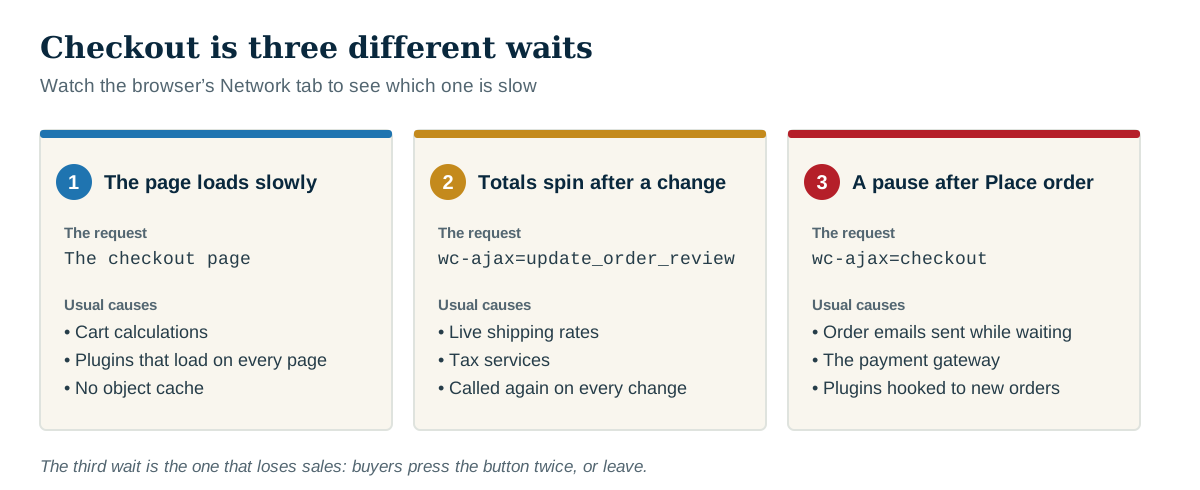
Checkout is three different waits, and each has different causes. Open the browser's developer tools, go to the Network tab, and watch which request takes the time.
| What the customer sees | The request | Usual causes |
|---|---|---|
| The checkout page itself loads slowly | The checkout page | Cart calculations, plugins loading on every page, no object cache |
| The totals spin after changing address or shipping | ?wc-ajax=update_order_review | Live shipping rates and tax services, called again on every change |
| A long pause after Place order | ?wc-ajax=checkout | Order emails, the payment gateway call, plugins hooked to new orders |
The third one is the one that loses sales. Customers press the button twice, or leave.
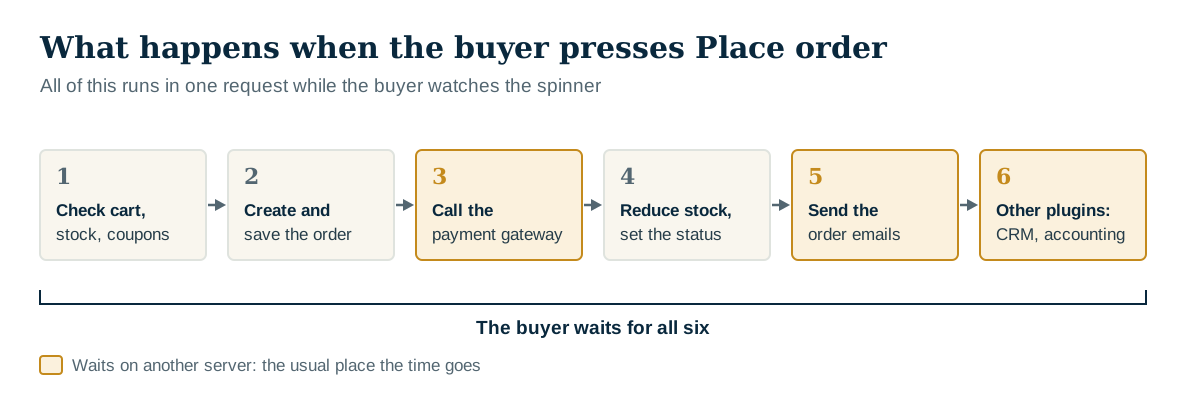
What happens when the customer presses Place order?
In one request, while the customer waits, WooCommerce typically:

- checks the cart, stock and coupons
- creates the order and saves it, with its items and meta data
- calls the payment gateway and waits for its answer
- reduces stock and changes the order status
- sends the new-order email to the store and the confirmation email to the customer
- runs everything other plugins have attached to those steps: accounting sync, CRM, marketing lists, fraud checks, invoices, inventory feeds
Steps 3, 5 and 6 are where the time usually goes, because they wait on other servers.
The common causes, and what to do
Order emails sent during checkout. Sending two emails through the server's own mail program, or through a slow mail service, can add seconds. WooCommerce can send them in the background instead with one filter:
add_filter( 'woocommerce_defer_transactional_emails', '__return_true' );Test it on a copy first, and check that both emails still arrive. A dedicated email-sending service is usually faster than the server's mail program as well.
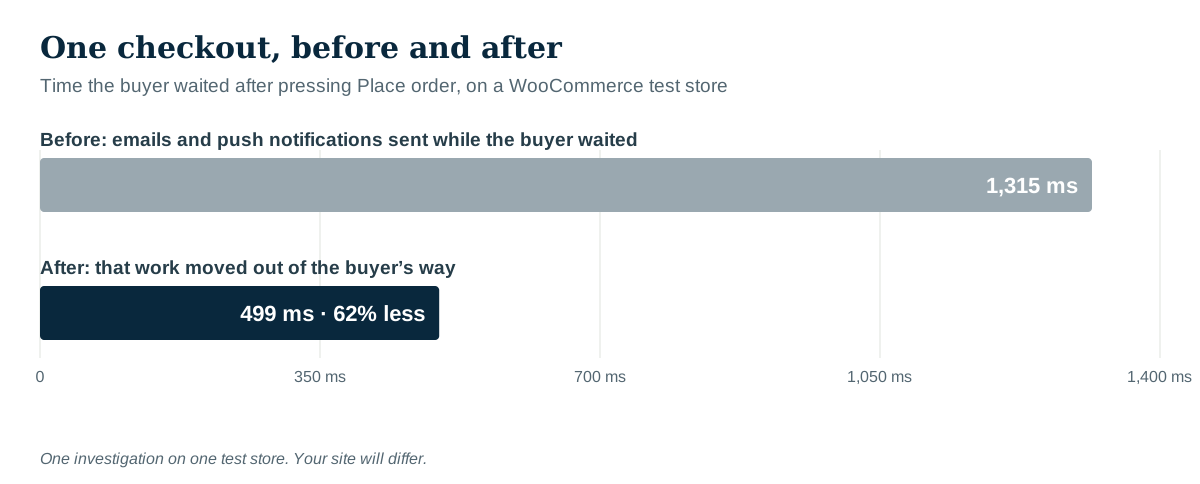
Calls to other services. The payment gateway has to answer before the order can complete, so that wait is unavoidable, but a sync to a CRM, an accounting system or a mailing list does not need to happen while the customer watches. If a plugin offers a "sync in the background" or "queue" option, use it.
Live shipping and tax rates. Every change of address or shipping method calls the carrier or tax service again. Check the plugin's settings for caching of rates.
Repeated database queries. A plugin that looks up the same thing for every cart item can run hundreds of queries. One query taking 2 ms is nothing; the same query 300 times is most of a second.
No object cache. Checkout runs the full WordPress start-up for a logged-in or session-holding customer. A persistent object cache (Redis or Memcached, if the host offers it) helps WooCommerce more than almost any other kind of site.
Will a caching plugin fix a slow checkout?
No. Cart, checkout and account pages must not be page-cached, and good caching plugins exclude them automatically. A caching plugin makes the rest of the store faster and leaves checkout exactly as slow as before. Checkout has to be fixed by making the server do less work.
Does moving work to the background lose anything?
It can, if it is done carelessly. Work moved to the background still has to happen, and it now happens later: if the background queue is not running, the emails and syncs do not happen at all. After deferring anything, place a test order and confirm the emails arrive and the order reaches every system it should. Many WooCommerce extensions queue their work in Action Scheduler; see Action Scheduler past-due actions for checking that it runs.
How to test a change
Use a staging copy with the payment gateway in test mode. Place the same order, with the same products, shipping method and payment method, three times before and three times after the change: one slow answer from an outside service should not decide anything. Then check the order status, the emails and every system the order syncs to.
How Paul Bunyan helps
Paul Bunyan records the Place order request like any other, and shows where its time went: each email sent while the customer waited (PB-2301), each call to another service with its address and time (PB-2401), repeated queries (PB-2502), and the plugins whose functions ran. In the visitor's browser it times the checkout calls themselves, so a slow wc-ajax=checkout can be matched to the server request behind it (PB-2802). Background jobs are timed separately on the Background screen.
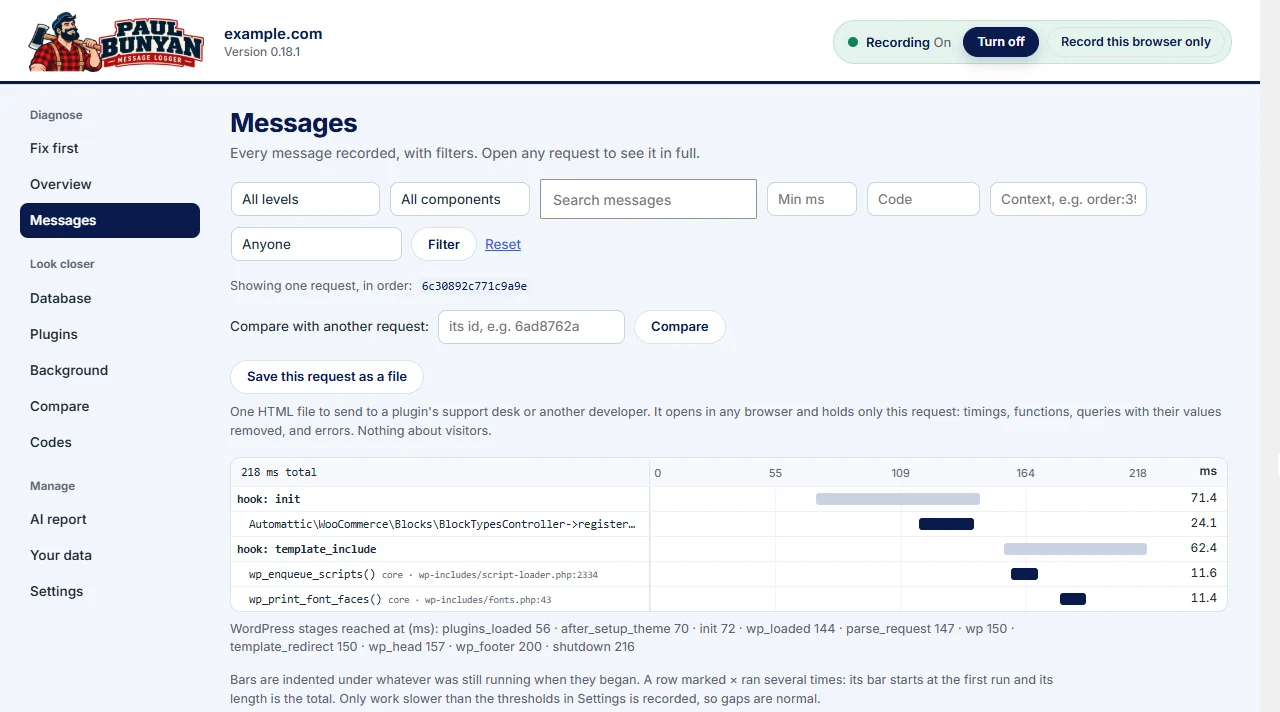
Paul Bunyan Professional adds order trails: everything done for one order, across the checkout request, the payment callback and the background emails, read as one story. See pricing.
See it on a real store: in a custom WooCommerce case study, Paul Bunyan caught a checkout warning that appeared only after the store moved to WooCommerce’s newer order storage.