
On this page
The WordPress admin is slow when plugins do work on every dashboard page that the public site never shows: license and update checks that wait on other companies' servers, news widgets, admin notices, large lists that run slow queries, and background calls to admin-ajax.php that repeat while the screen is open. The admin is never page-cached, so you feel every one of them.
Why is the front end fast but the dashboard slow?
Visitors usually get a cached copy of each page, built once and served many times. The dashboard is built from scratch every time, for every click, and plugins add work to it that they do not add to the public site. A site can score well in a speed test and still take five seconds to open the Posts screen.
The usual causes
- Calls to outside servers. A plugin checks its license, looks for updates, or fetches news for a dashboard widget, and waits for the answer. If that server is slow or down, every admin page waits for it, sometimes until a timeout of several seconds.
- Autoloaded data. Settings marked to load on every request are loaded on every admin page too. A few plugins store megabytes there.
- Slow list screens. Orders, products and posts screens with filters, counts and extra columns can run heavy queries, especially on large stores.
- Background admin-ajax.php calls. Covered below.
- No object cache. Logged-in requests repeat many lookups a persistent object cache would remember.
What is admin-ajax.php, and why is it slow?
admin-ajax.php is the address WordPress pages use to talk to the server in the background without reloading: saving a draft, refreshing a counter, loading a widget. Each call carries an action name saying what it is for. Despite its name, the front end of the site uses it too.
Every call to admin-ajax.php loads the whole of WordPress and every active plugin before it does its small job. So a call that does 10 ms of work can take 500 ms, and a page that makes several of them makes the server do that start-up several times.
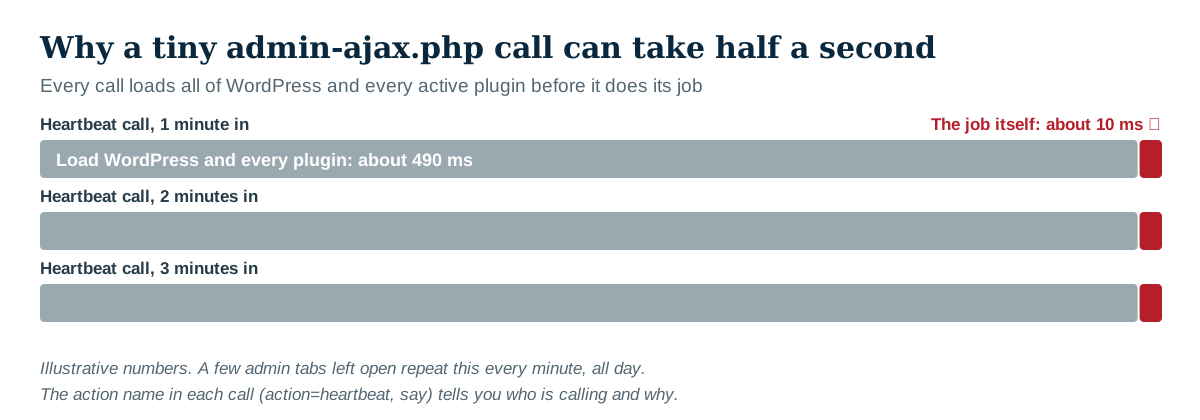
When admin-ajax.php shows up as slow in a host's report or a speed test, the address alone tells you nothing. The action name tells you who is calling and why.
How to find which admin-ajax call is slow
- Open the slow screen with the browser's developer tools on the Network tab.
- Filter by
admin-ajax. - Click each call and look at its payload for
action=. That names the job, and usually the plugin. - Note how long it took and how often it repeats.
The most common action is heartbeat. The WordPress Heartbeat keeps sessions alive, warns when someone else is editing the same post, and saves drafts. It repeats on a timer while an admin screen is open, so a few tabs left open all day can add up to thousands of requests. Heartbeat is useful in the post editor. Elsewhere, slowing it down is usually safe; switching it off everywhere breaks post locking and autosave.
How to fix a slow admin
- Find the outside calls. If a plugin is waiting on its license or update server, update it, check its settings for the check, or ask the author. A plugin that phones home on every admin page is a bug worth reporting.
- Check autoloaded data. Site Health (Tools > Site Health) warns when autoloaded options are large in recent WordPress versions. Find which plugin owns the largest ones.
- Trim the screens you use most. Remove dashboard widgets you never read, hide columns you do not need, and reduce items per page on heavy list screens.
- Close the tabs. Admin tabs left open keep sending Heartbeat calls.
- Turn on an object cache if the host offers Redis or Memcached.
Test each change on its own and compare the same screen before and after, logged in as the same user.
When is it the host?
If the requests themselves are quick on the server but still slow to arrive, the server may be out of PHP workers: every worker is busy, and new requests queue. Many admin tabs, background calls and crawlers at once can cause this on small hosting plans. Give the host the times of the slow requests and ask whether requests were queueing or hitting a CPU limit.
How Paul Bunyan helps
Paul Bunyan's Plugins screen splits every plugin's cost by front end, dashboard, AJAX and background jobs, so a plugin that is cheap for visitors and expensive in the admin stands out. Every AJAX request is recorded with its action name, the outside calls it made (PB-2401) and its queries. Setup checks flag heavy autoloaded data (PB-3001) and a missing object cache (PB-3002). And a plugin file that loads all of WordPress by being called directly, a heavier relative of admin-ajax.php, is flagged as PB-2103.

In a custom WooCommerce case study, a store-manager page spent 407 ms on PHP work and only 7.7 ms on database queries. Replacing one loop took it from 551 to 213 ms.