
PAUL BUNYAN
Diamond Sierra Site Defense Pro
Diamond Sierra Site Defense Pro is a separate add-on to the free plugin, for people who clean hacked sites or look after many. It adds one-click cleanup, a recovery kit, protection after login, supply-chain and checkout watches, and an alert center. The free plugin keeps working fully on its own.
Install Pro
- Keep the free Diamond Sierra Site Defense plugin installed and active.
- Under Plugins › Add New › Upload Plugin, upload
diamond-sierra-site-defense-pro.zipand activate it. - Open Site Defense › Pro, paste your license key and click Activate. Pro adds a Recovery tab and Pro cards in Settings.
- If you deactivate Pro, its settings are kept and its features pause. The free plugin keeps protecting the site and still recognizes Pro’s files as genuine, so they are not reported as malware.
Cleanup and recovery
- A database scan of posts, options, page-builder data, widgets and other plugins’ tables, for injected scripts and encoded payloads.
- Hidden and suspicious administrators, hijacked site addresses, “anyone can register as administrator”, new must-use plugins and malicious scheduled tasks.
- One-click fixes: remove injected code with a backup and undo, delete payloads, remove admin rights or rogue accounts, remove planted tasks, and put the site address back.
- “Fix automatically”: every serious issue that has a safe fix, in one click.
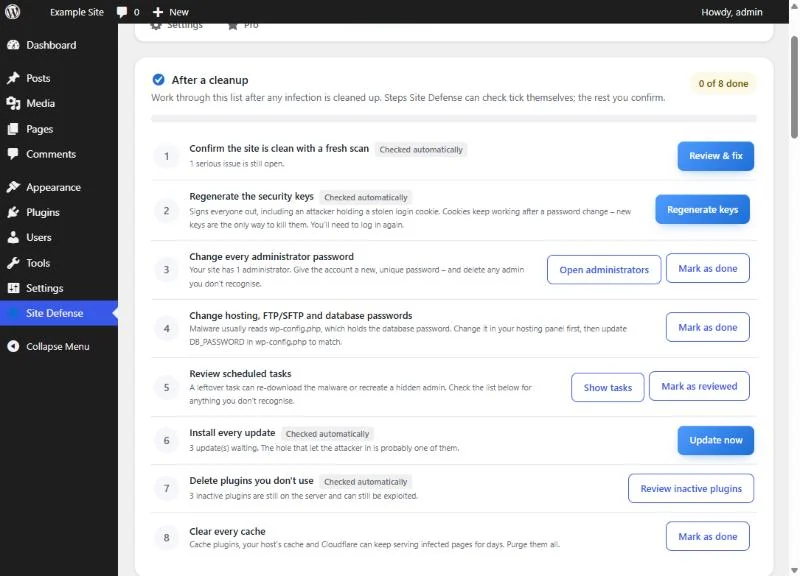
- A recovery kit on the Recovery tab: the post-cleanup checklist, where steps Site Defense can verify tick themselves; new security keys in one click, which signs everyone out, including anyone using a stolen cookie; and theme repair from WordPress.org.
- The scheduled-tasks list names the plugin behind each task. Tasks that belong to an active plugin are marked “Keep it”, and only tasks with no owner at all are called safe to delete.
Protection after login
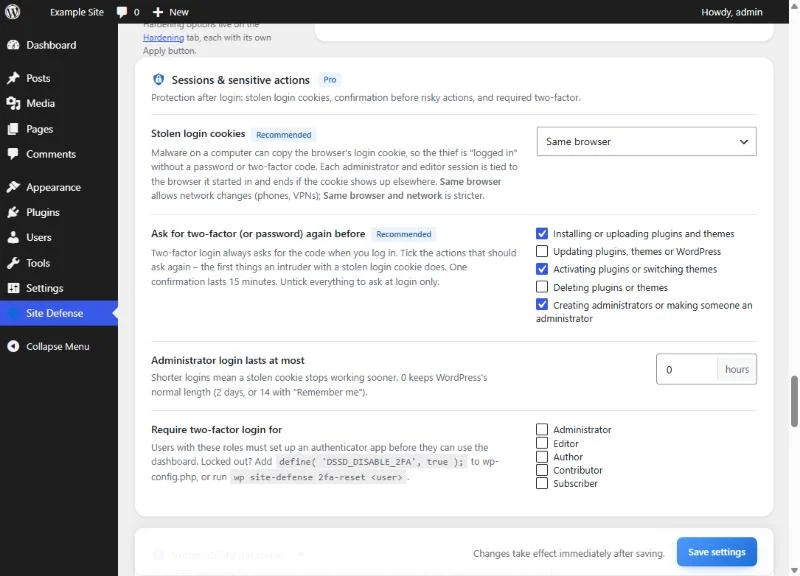
- Stolen-cookie protection: administrator and editor sessions are tied to the browser they started in. The default, Device, allows network changes for phones and VPNs; Strict also ties the session to the network.
- “Confirm it’s you” asks for the two-factor code or password again before sensitive actions, then trusts you for 15 minutes. It covers the dashboard, admin-ajax and the REST API. You choose the actions: installing or uploading, updating, activating, deleting plugins and themes, and creating administrators. Installing, activating and creating administrators are on by default.
- A maximum login length for administrators, and required two-factor login for the roles you choose.
Supply chain and online stores
- An alert when the people behind a WordPress.org plugin you use change.
- Premium and custom plugins and themes are fingerprinted, and changes made without an update are reported.
- Plugins hidden from the Plugins screen are reported.
- A WooCommerce checkout watch for card skimmers: new script domains, fake card fields and known injections.
- Matching against known vulnerabilities, with your own API key for a public vulnerability database. The feed is checked once a day.
CAPTCHA for online stores
- Invisible Google reCAPTCHA v3. Create a separate “Score based (v3)” key, because v2 keys do not work. The threshold starts at 0.5: lower it to 0.3 if real customers are refused, or raise it to 0.7 if bots get through.
- CAPTCHA on the WooCommerce My Account login, registration and lost-password forms, and on the classic checkout, with whichever CAPTCHA you chose. After a failed order the CAPTCHA resets so the customer can try again.
- The WooCommerce block checkout is not covered in version 1.0.0.
Alerts and agency tools
- An alert center: every administrator or editor login, lockouts, firewall auto-blocks, plugin and theme changes, user and role changes and security settings changes. Plugin, user and settings changes are on by default.
- Extra recipients, one per line, who also get the free plugin’s alerts. Delivery is instant, at most 10 emails an hour with the rest held for a digest, or an hourly or daily digest.
- Slack, Discord or any JSON webhook.
- A weekly summary every Monday at 08:00, with the security score, open issues, attacks blocked and lockouts.
- An activity log of logins, plugin and theme changes, users, roles, passwords and key settings, on the Firewall tab under Activity.
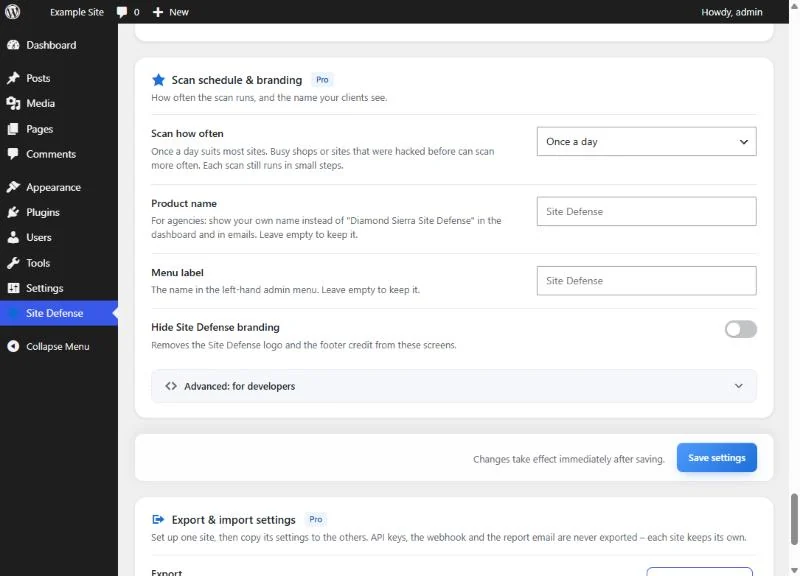
- Scans daily, twice a day or every hour.
- White-label: your own product name in the dashboard, menu and emails, your own menu label, and a switch that removes the Site Defense logo and footer credit.
- Settings export and import between sites. API keys, the webhook and the report email are never exported.
Your own rules
Under Settings › Advanced (closed by default) you can add your own malware patterns and firewall blocks, one per line. Rules that are not valid are dropped when you save, and logged-in administrators are never blocked by your firewall rules.
- Malware patterns:
severity | files | name | /regex/. Severity is critical, high, medium or low. Files isphp,web(JavaScript and HTML) orconfig(.htaccess and .user.ini). Example:high | php | Old backdoor | /eval\(\$_POST/ - Firewall blocks:
name | query or all | /regex/. Example:Debug probes | query | /debug_mode=1/
WP-CLI
Pro adds these commands to the free plugin’s recovery commands:
wp site-defense scanstarts a scan.wp site-defense statusandwp site-defense findings --min-severity=highshow the score and open findings, with--formatfor scripts.wp site-defense block <ip> --minutes=60 --reason="..."blocks an address.wp site-defense firewall-mode <mode>switches between blocking and log only.wp site-defense vulnslists known vulnerabilities in installed plugins.wp site-defense export-settingsandwp site-defense import-settings <file>copy settings between sites.
See it at work
Free and Pro compared
| Diamond Sierra Site Defense | Pro | |
|---|---|---|
| Price | Free | From $39 a year |
| Where to get it | WordPress.org | diamondsierra.com |
| Daily malware scan of files, with fixes you can undo | Yes | Yes |
| Firewall, login protection and two-factor login | Yes | Yes |
| Email alerts and hardening with a security score | Yes | Yes |
| Database cleanup and “Fix automatically” | Yes | |
| Recovery kit after a hack | Yes | |
| Stolen-cookie protection and “Confirm it’s you” | Yes | |
| Plugin ownership, checkout and vulnerability watches | Yes | |
| Alert center, webhooks, activity log and white-label | Yes | |
| Scans | Daily | Daily, twice a day or hourly |
Prices
| Live sites | Price per year |
|---|---|
| 1 site | $39 |
| 10 sites | $99 |
| 50 sites | $199 |
Prices are in US dollars. Each plan renews automatically once a year, and you can ask for a refund within 14 days.
Licensing
- After you buy, the license key is in your order confirmation email and under My Account › Licenses.
- Paste the key on the Pro tab and click Activate. Pro switches on straight away, and updates appear on the Plugins screen.
- Pro works for the first 3 days after you enter a key, before the store has confirmed it.
- The key is checked once a day. Short store outages change nothing, and the next successful check keeps Pro on.
- An ended key keeps Pro working, without updates or support until you renew.
- Pro switches off only when there is no key, when the key is refunded, canceled, blocked or over its site limit, or when the site has had no signed answer from diamondsierra.com for 30 days (for example, because outgoing connections are blocked).
- To move Pro to another site, remove the key from the old site first, on the Pro tab or under My Account › Licenses.
What Pro sends
- diamondsierra.com: when you activate a key, once a day and when WordPress checks for updates, it sends the key, your site’s address and the versions of the plugin, WordPress and PHP. Every reply is signed by the store.
- A vulnerability database: only if you paste your own API key.
- Google reCAPTCHA v3: only if you choose it, on the forms it protects.
- Your webhook: only if you add one. Each alert is posted as one line with your site’s address and what happened.