Every Paul Bunyan setting, its default, and when to change it.
Updated · By Diamond Sierra
On this page
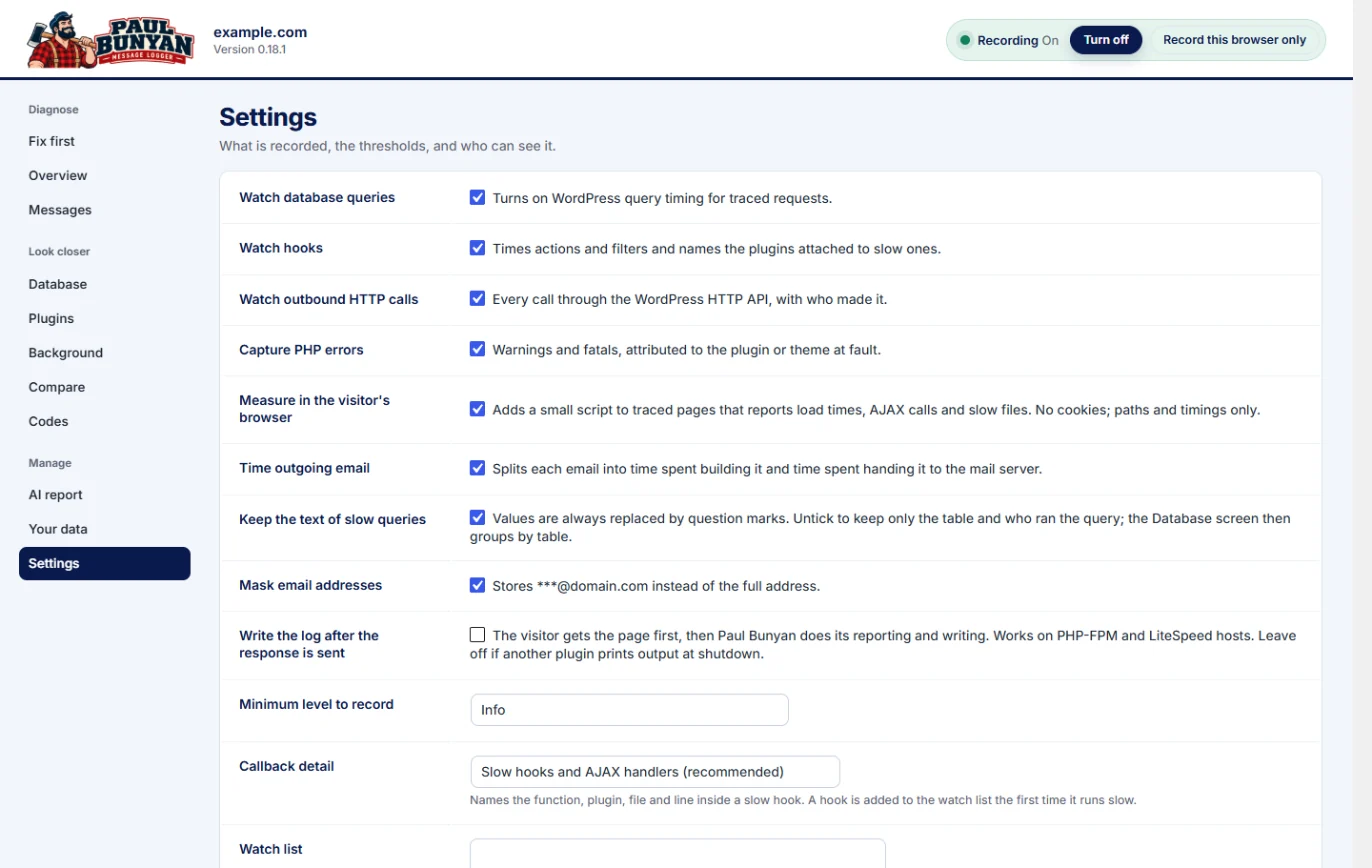
All settings are on Paul Bunyan → Settings. The defaults suit most sites. Change them while you investigate something specific, then put them back. Turning recording on and off is not a setting: it is the switch in the header (see Turn recording on and off).
What is recorded
Setting
Default
What it does
Watch database queries
On
Times queries on traced requests.
Watch hooks
On
Times actions and filters and names the plugins attached to slow ones.
Watch outbound HTTP calls
On
Every call through the WordPress HTTP API, with who made it.
Capture PHP errors
On
Warnings and fatal errors, matched to the plugin or theme at fault.
Measure in the visitor's browser
On
Adds a small script to traced pages that reports load times, AJAX calls and slow files. No cookies; paths and timings only.
Time outgoing email
On
Splits each email into time spent building it and time spent handing it to the mail server.
Keep the text of slow queries
On
Values are always replaced by question marks. Untick it to keep only the table and who ran the query; the Database screen then groups by table.
Mask email addresses
On
Stores ***@domain.com instead of the full address.
Write the log after the response is sent
Off
The visitor gets the page first, then Paul Bunyan writes its log. Works on PHP-FPM and LiteSpeed hosts. Leave it off if another plugin prints output at shutdown.
Minimum level to record
Info
Messages below this level are dropped where they are logged. Verbose records everything, including PHP notices.
Callback detail
Slow hooks and AJAX handlers
Names the function, plugin, file and line inside a slow hook. "Every hook" is the heaviest; use it only for short sessions.
Watch list
Empty
Hooks to time function by function on every traced request, one per line. End a line with * to match a prefix, for example woocommerce_email_*.
Settings, top half.
How much is traced
Setting
Default
What it does
Trace this percent of requests
100
Slow requests and errors are logged whatever this is set to. Lower it on busy sites.
Discovery: percent of traced requests that watch every hook
5
Finds slow hooks nobody knew about, then adds them to the watch. Costly on a heavy page, so keep it low.
Thresholds
Setting
Default
Slow request threshold
1000 ms
Slow page load in the browser
3000 ms
Slow query threshold
50 ms
Slow hook threshold (total time inside one hook)
50 ms
Slow callback threshold (one function inside a watched hook)
10 ms
Slow HTTP call threshold
500 ms
Safety and storage
Setting
Default
What it does
Safety limit on Paul Bunyan's own cost
150 ms
If Paul Bunyan itself costs more than this on five ordinary requests inside ten minutes, it switches itself off and says why (PB-1008).
Maximum stored messages
200,000
If the table grows past this, the oldest messages go first and Paul Bunyan reports it (PB-1003).
How long messages are kept
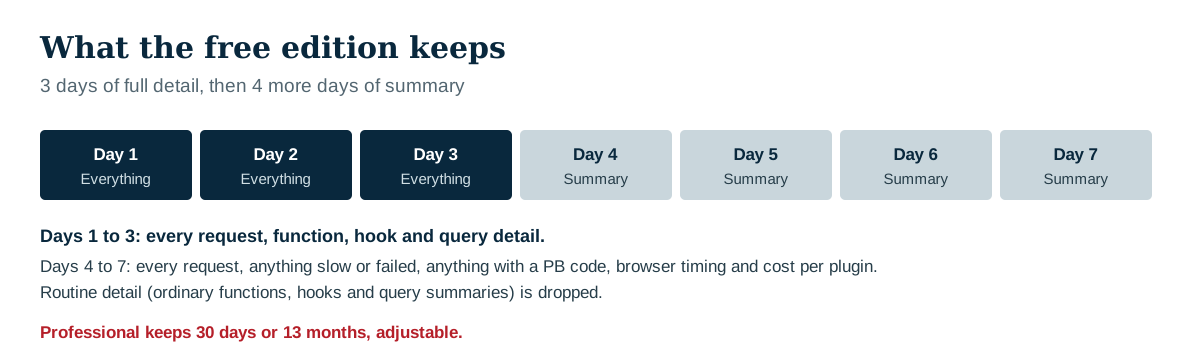
In the free edition, Paul Bunyan keeps 3 days of full detail and 7 days of summary. From day 4 to day 7 it keeps every request, anything slow or failed, anything with a PB code, browser timings and cost per plugin, and drops the routine detail. Professional adds longer history. The Your data screen shows exactly what is kept and for how long.
Ask AI
Ask AI, "Explain this" and the AI summary in the email report are part of Professional, where you choose the AI service and add your own key. The free edition keeps the AI report, which you copy or download yourself. See The AI report and AI assistants.
We use cookies on our website to give you the most relevant experience by remembering your preferences and repeat visits. By clicking “Accept All”, you consent to the use of ALL the cookies. However, you may visit "Cookie Settings" to provide a controlled consent.
This website uses cookies to improve your experience while you navigate through the website. Out of these, the cookies that are categorized as necessary are stored on your browser as they are essential for the working of basic functionalities of the website. We also use third-party cookies that help us analyze and understand how you use this website. These cookies will be stored in your browser only with your consent. You also have the option to opt-out of these cookies. But opting out of some of these cookies may affect your browsing experience.
Necessary cookies are absolutely essential for the website to function properly. These cookies ensure basic functionalities and security features of the website, anonymously.
Cookie
Duration
Description
cookielawinfo-checkbox-analytics
11 months
This cookie is set by GDPR Cookie Consent plugin. The cookie is used to store the user consent for the cookies in the category "Analytics".
cookielawinfo-checkbox-functional
11 months
The cookie is set by GDPR cookie consent to record the user consent for the cookies in the category "Functional".
cookielawinfo-checkbox-necessary
11 months
This cookie is set by GDPR Cookie Consent plugin. The cookies is used to store the user consent for the cookies in the category "Necessary".
cookielawinfo-checkbox-others
11 months
This cookie is set by GDPR Cookie Consent plugin. The cookie is used to store the user consent for the cookies in the category "Other.
cookielawinfo-checkbox-performance
11 months
This cookie is set by GDPR Cookie Consent plugin. The cookie is used to store the user consent for the cookies in the category "Performance".
viewed_cookie_policy
11 months
The cookie is set by the GDPR Cookie Consent plugin and is used to store whether or not user has consented to the use of cookies. It does not store any personal data.
Functional cookies help to perform certain functionalities like sharing the content of the website on social media platforms, collect feedbacks, and other third-party features.
Performance cookies are used to understand and analyze the key performance indexes of the website which helps in delivering a better user experience for the visitors.
Analytical cookies are used to understand how visitors interact with the website. These cookies help provide information on metrics the number of visitors, bounce rate, traffic source, etc.
Advertisement cookies are used to provide visitors with relevant ads and marketing campaigns. These cookies track visitors across websites and collect information to provide customized ads.